> For the complete documentation index, see [llms.txt](https://blog.h4vox.site/llms.txt). Markdown versions of documentation pages are available by appending `.md` to page URLs; this page is available as [Markdown](https://blog.h4vox.site/malware-techniques/how-to-detect-xor-obfuscation.md).
# How to Detect XOR Obfuscation
this blog covers how to detect the XOR obfuscation techniques
In Earlier Blog, i discussed and published generic obfuscation techniques employed to conceal malware. It remains unsurprising that malicious software employs a variety of straightforward methods to evade detection.
I wish to provide further detail on one specific technique mentioned previously: the exclusive or (XOR) logical operation. In computer science, XOR is a bitwise operation utilized to manipulate values, alongside other operations such as AND, OR, and NOT. During my initial study of discrete mathematics, I recall constructing truth tables to gain a clearer understanding of bitwise operations. A truth table applies Boolean logic to evaluate an expression; below is a basic example for the XOR operation.
As the table illustrates, the output is true only when the input values differ. When the inputs are identical, the output is false.
Consider a practical application of the XOR operation. We shall apply XOR to the letter ‘J’ and the letter ‘v’ and examine the outcome. First, we consult the standard ASCII table to determine the corresponding numeric values for these characters.
The value for ‘J’ is 0x4A, and for ‘v’ it is 0x76. A byte comprises 8 bits, and each hexadecimal digit represents 4 bits; thus, two hexadecimal digits constitute one byte. Converting 0x4A and 0x76 to binary yields 01001010 and 01110110, respectively.
Now, if you’re looking at the chart and are confused by all the numbers, you may need to brush-up on different numbering systems. The numbers corresponding to the values here are actually all the same number, just represented differently. Discussing various numbering systems is outside the scope of this blog, so if you need help understanding the difference, I suggest doing some research on hexadecimal first, since that’s what we’ll primarily be using.
Ok, now we can XOR these two values at the bit level, so let’s go ahead and do that.
01001010 (0x4A) 01110110 (0x76) 00111100 (0x3C)
Our result is 0x3C, which in ASCII is a less-than sign (<). Pretty neat, huh? **A malicious approach** After reading the examples above, you might have been able to figure out that this same technique could be used as a simple form of encryption/obfuscation in malware.
In fact, most malware I look at nowadays has some form of XOR obfuscation. Whether it’s to decode strings, an embedded file, or self-modifying code, using the XOR operator is good at getting the job done. Why is it used so much? Well, when compared to cryptography, bitwise operations and rotations are much easier to implement while programming.
In this article I’m going to cover three examples where files have been obfuscated using an XOR sequence. These three scenarios will all use the XOR operation to obfuscate the malware, but all in different ways. These obfuscated samples were all found in the wild and have all been identified as some form of malware.
Let take the sample file from online forum to well understnd how attacker actually does this
### **Scenario 1 (**[**Method 1: Single-Byte XOR**](/malware-techniques/quickstart.md#method-1-single-byte-xor)**):**
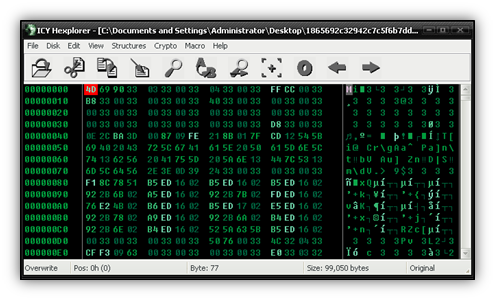
I received the file below from a user on our forums and soon discovered something wasn’t right after opening it in a hex editor.
One skill that is useful to have when trying to decrypt a file is pattern recognition. What is the pattern you see in the image above? It’s also important to know file structure, especially for a Portable Executable (PE) file. In some cases, knowing what a byte is *supposed* to be in its de-obfuscated form can be the difference in finding a reliable pattern or not.
IAs we know we seen multiple Methods of XOR obfuscation, if there is one flaw to using XOR to obfuscate your file, it’s that any byte you XOR with 0 stays the same. Therefore, if you are going to XOR an entire file with the same byte, anytime you encounter a zero, that byte will then become the XOR key.
Ok, getting back to the point, this first one is pretty easy. by looking into the HEX dump it look like this obfuscation is done using XOR single Byte Obfuscation [(Method 1)](/malware-techniques/quickstart.md#method-1-single-byte-xor), because after examining the file it appears that every other byte needs an XOR of 0x33 applied, or a ‘3’ in ASCII. The easiest way to fix the file is to write a quick script. I like C++, but you could use any language to do this really. First I renamed the obfuscated file to malware and then I wrote the following code.
```cpp
#include
#include
int main() {
std::ifstream inputFile("malware", std::ios::binary);
std::ofstream outputFile("decode", std::ios::binary);
if (!inputFile.is_open()) {
std::cerr << "Failed to open input file.\n";
return 1;
}
if (!outputFile.is_open()) {
std::cerr << "Failed to open output file.\n";
return 1;
}
char byte;
int counter = 0;
while (inputFile.get(byte)) {
unsigned char ubyte = static_cast(byte);
if (counter % 2 == 1) {
ubyte ^= 0x33;
}
outputFile.put(static_cast(ubyte));
counter++;
}
inputFile.close();
outputFile.close();
return 0;
}
```
It’s a very simple script, and just reads one byte at a time until the end of the file (EOF) is reached, performing an XOR 0x33 against every other byte. Below we have our decrypted file, which I just called ‘decode’. As you can see, the decrypted file now looks like a normal PE.
Regrettably, the sample proved incomplete. Nevertheless, it served as valuable practice and an appropriate introduction to the subsequent, more complex scenarios.
### Scenario 2 ([**Method 3: Multiple Key-Byte XOR**](/malware-techniques/quickstart.md#method-3-multiple-key-byte-xor)):
The next example proved more challenging. A researcher provided this file, which had been dropped by a web exploit. Unlike typical exploit payloads, this file was written to disk in an obfuscated state. Whether due to an error or deliberate design, further investigation confirmed the use of XOR obfuscation.
Initial inspection reveals a markedly different structure from the first sample: every byte appears altered, with no immediately discernible pattern.
Given that the file is dropped and executed from an exploit, it is presumed to be a PE binary, implying the presence of multiple zero bytes within its headers. One possibility can be immediately excluded: a single constant XOR key, as employed in the first sample, would produce repeating sequences where zeros occur.
Reflecting on the zero bytes, recall that x ^ 0 = x. In the decrypted file from Scenario 1, the third row consists entirely of zeros. Examining the corresponding row in the current sample yields: 96 08 FA EC DE C0 22 84 66 58 4A BC 2E 90 72 54. Searching the entire file for this 16-byte sequence reveals multiple matches.
Further observation discloses a repeating 128-byte pattern commencing with 56 48 BA 2C. To validate this hypothesis, the first 64 bytes of the pattern were XORed against the first 64 bytes of the file using a hex editor supporting bitwise operations (such as ICY Hexplorer).
The result confirmed the pattern’s validity. A modified script incorporating the 128-byte sequence as a repeating key was then applied to fully decode the file.
```cpp
#include
#include
#include
#include
int main() {
const std::vector decode = {
0x56, 0x48, 0xBA, 0xC9, 0xE0, 0xE2, 0xC4, 0x26, 0x98, 0x0A,
0xFC, 0xEE, 0xD0, 0x32, 0x94, 0x76, 0x68, 0x5A, 0x4C, 0xBE,
0x20, 0x82, 0x64, 0x46, 0xBB, 0x2A, 0x9C, 0x0E, 0xF0, 0xD2,
0x34, 0x96, 0x08, 0xFA, 0xEC, 0xDE, 0xC0, 0x22, 0x84, 0x66,
0x58, 0x3A, 0xAC, 0x8E, 0x70, 0x52, 0x54, 0xB6, 0x28, 0x9A,
0x0C, 0xFE, 0xE0, 0xC2, 0x32, 0x4C, 0x86, 0x78, 0x96, 0x6A,
0xCC, 0x3E, 0xA0, 0x82, 0xE4, 0xC6, 0x38, 0xAA, 0x1C, 0xBE,
0xD8, 0x5A, 0x44, 0x16, 0x88, 0x7A, 0x6C, 0x5E, 0x40, 0xA2,
0x04, 0xE6, 0x08, 0xCA, 0x3C, 0xAE, 0x10, 0xF2, 0xD4, 0x36,
0xA8, 0x1A, 0x8C, 0x7E, 0x60, 0x42, 0x0A, 0x06, 0xF8, 0xEA,
0xDC, 0xCE, 0x30, 0x92, 0x74
};
std::ifstream inputFile("malware128.exe", std::ios::binary);
std::ofstream outputFile("decode128.exe", std::ios::binary);
if (!inputFile || !outputFile) {
std::cerr << "Error opening files.\n";
return 1;
}
uint8_t byte;
size_t counter = 0;
while (inputFile.read(reinterpret_cast(&byte), 1)) {
byte ^= decode[counter];
counter++;
if (counter > 127) {
counter = 0;
}
outputFile.write(reinterpret_cast(&byte), 1);
}
return 0;
}
```
This sample required greater analytical effort but remained tractable. The final scenario presents the most sophisticated approach encountered.
### **Scenario 3 (**[**Method 2: Rolling Single-Byte XOR**](/malware-techniques/quickstart.md#method-2-rolling-single-byte-xor)**):**
The concluding example exhibits greater complexity. Periodic searches on VirusTotal occasionally uncover user or honeypot submitted obfuscated malware. Recently, one sample proved particularly noteworthy. At first glance, de-obfuscation appeared straightforward.
Those familiar with the prior scenarios would immediately recognize the recurring 0x29 value. Applying XOR 0x29 across the entire file seemed a logical initial step.
Hmm…well that’s definitely not right. I don’t see a DOS stub or a PE header here, but it does look like the zero values are in the right places. So, we can conclude that zero values need an XOR 0x29 applied, but we’re still unsure about the rest.
After some further inspection, it’s easy to notice this file is a PE file, even though it’s obfuscated. If you compare the format of this obfuscated file with that of the de-obfuscated one on our first scenario, you’ll notice the similarities in file structure; both might have been passed through the same type of compiler.
Remember, it’s useful to know what values are *supposed* to be de-obfuscated. Now we can use a simple equation to determine what the XOR value is for some of these bytes. Suppose we start with the string ‘This program cannot be run in DOS mode.’ that’s located in the DOS stub. First we’ll decode the letter ‘o’, which in ASCII is a 0x6F (0xBA in our obfuscated file).
XORKEY = 0x6F ^ 0xBA XORKEY = 0xD5
After some time I managed to start building a lookup table ranging from 0x00 to 0xFF. For every byte I encountered in the obfuscated file, I placed a corresponding XOR value to retrieve the de-obfuscated byte. Here is what I managed to find out after a little work. Notice you can see the 0xBA value needs an XOR 0xD5 applied, just like we determined above.
If you look at the area I circled, you’ll see that the second hex value in the byte follows a pattern: 1155995511559955…and so on. Using this pattern and a little trial and error, I managed to fill in the rest of the table and successfully de-obfuscate the file with another script.
### **Conclusion**
Although the present discussion focuses primarily on the exclusive or (XOR) operator, it represents merely a fraction of the broader spectrum of binary obfuscation techniques. Other approaches, such as bit rotations and additional bitwise operations, can likewise be employed to conceal data. Nevertheless, XOR continues to predominate in practice owing to its exceptional simplicity and operational effectiveness.
More advanced malware variants may incorporate established cryptographic algorithms—including DES, RC4, or AES thereby requiring sophisticated cryptanalytic methods that extend well beyond the scope of the techniques described herein.
I trust that this article has furnished a clear and useful understanding of the principles and practical applications of XOR-based obfuscation. The enduring prevalence of these methods in malicious software arises from their straightforward implementation, consistent efficacy, and capacity for flexible adaptation. It is reasonable to anticipate that XOR obfuscation techniques will remain a prominent mechanism for evading detection by antivirus, antimalware solutions, and network-based security systems for the foreseeable future.
---
# Agent Instructions
This documentation is published with GitBook. GitBook is the documentation platform designed so that both humans and AI agents can read, navigate, and reason over technical content effectively. Learn more at gitbook.com.
## Querying This Documentation
If you need additional information that is not directly available in this page, you can query the documentation by asking a question.
Perform an HTTP GET request on the following URL with the `ask` and `goal` query parameters:
```
GET https://blog.h4vox.site/malware-techniques/how-to-detect-xor-obfuscation.md?ask=&goal=
```
`ask` is the immediate question: it should be specific, self-contained, and written in natural language.
`goal` is what the user is ultimately trying to achieve, the reason they need the answer. Sharing it helps GitBook give you a better, more relevant answer. A goal is most helpful when it describes the outcome the user wants rather than restating the question. For example, with `ask=how do I create an API token`, a goal like `automate deployments from our CI pipeline` lets GitBook tailor the answer to that use case.
The response will contain a direct answer to the question and relevant excerpts and sources from the documentation.
Use this mechanism when the answer is not explicitly present in the current page, you need clarification or additional context, or you want to retrieve related documentation sections.